Check Domain Availability Before You Buy
Check whether a domain can be registered, verify its RDAP status, spot premium and renewal costs, assess name risk, and confirm ownership.

WordPress hosting and renewal-cost traps
She audits WordPress plans, renewal bills, backups, and plugin-heavy stores for independent operators.
Check a domain in two places before paying: use a registrar search to see whether it can be ordered, then use ICANN Lookup or another RDAP client to inspect a registered name. A green result is only a snapshot. The domain is yours after registration completes in your account.
The warning comes first because domain-search pages are built to move you toward checkout. They may mix ordinary registrations, registry-premium names, names sold by current owners, and suggestions with different extensions. Those are different products with different costs and risks.
The two-minute domain availability check
Start with the exact name and extension you intend to use. example.com and example.net are separate registrations, as are a plural and singular spelling.
Then follow this order:
- Enter the complete domain in a registrar’s search tool.
- Note whether the exact name is available, registered, premium, listed for resale, or unsupported.
- If it is registered, check its record through ICANN Lookup or another RDAP client.
- If it can be ordered, read the registration, renewal, transfer, privacy, and restoration terms.
- Check the name for spelling, email clarity, and trademark risk.
- Register it, then confirm that it appears in the account and registration data you control.
Do not spend half an hour admiring alternatives before securing the name you have already approved. A search checks status. It does not hold inventory.
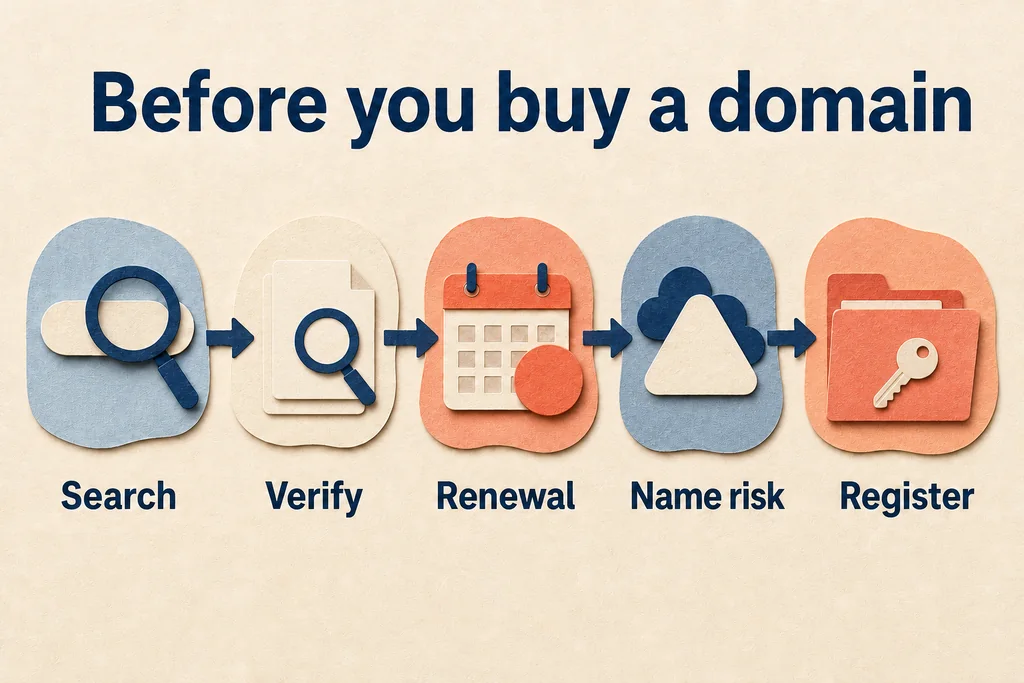
Check status, renewal terms, and name risk before registration, then confirm the domain appears in the account you control.
What an availability result actually means
Domain registrars normally use registry systems to check whether a name can be provisioned. The underlying EPP standard treats availability checking and domain creation as separate operations. That distinction matters: a positive check is not the registration request.
Another buyer could complete registration before your order reaches the registry. A registrar can also discover a restriction, premium classification, or unsupported requirement during checkout. Treat the cart as provisional until the order succeeds.
| Search result | Practical meaning | Next move |
|---|---|---|
| Available | The registrar currently believes it can request the registration | Review the full terms and complete the order |
| Registered | A registration record exists | Use RDAP to inspect status and dates, then choose an alternative or acquisition path |
| Registry premium | The registry applies special pricing to an otherwise unregistered name | Check acquisition, renewal, and transfer costs before paying |
| Aftermarket or resale | A current registrant is offering the name for sale | Treat it as an ownership transfer, not a normal registration |
| Reserved or unsupported | The registrar cannot offer the name through the ordinary flow | Check the TLD registry rules or choose another name |
A registrar’s suggestion engine is not a neutral naming committee. It is a sales page. Review alternatives because they work for your audience, not because they were placed in a bright card.
Registrar search versus RDAP lookup
Use the registrar search to answer the buying question: can this registrar attempt the registration, and on what terms?
Use RDAP to answer the registration-data question: does a record exist, which registrar manages it, what status is published, and what dates are available? ICANN describes RDAP as the standardized replacement for WHOIS for current registration data. Its Lookup service provides a public way to query that data.
RDAP data may be redacted. It is not a reliable way to obtain a registrant’s personal contact details, and that is not what you need for a basic availability check. The useful fields are the domain status, registrar, important dates, and authoritative links returned in the record.
An RDAP not-found response is useful evidence, but it is not a checkout button. A name can still be reserved, restricted, premium, or unsupported by a particular registrar. Confirm purchasability through a registrar connected to that TLD.
Check that the extension is real
The ending after the final dot is the top-level domain. The IANA Root Zone Database is the authoritative list of TLDs and their registry operators.
This matters when a search page suggests an unfamiliar extension. Confirm that the extension exists, identify the registry, and then read the registrar’s renewal and transfer terms. A clever ending is not useful if customers mistype it or your team cannot explain it aloud.
Read the renewal line before the promise
The first displayed price is not the ownership cost. Read the renewal line. Also check transfer pricing, privacy treatment, recovery fees, taxes, and any conditions attached to a promotional first term.
Intro pricing is a hotel minibar: the small number gets your attention, but it does not explain the stay.
Compare the same items at each registrar:
| Cost or term | Why it matters |
|---|---|
| Initial registration | What checkout charges for the first term |
| Renewal | The recurring cost of keeping the name |
| Transfer | The cost and conditions for moving away later |
| Privacy | Whether proxy or redaction services are included and supported for the TLD |
| Expiration recovery | What happens, and what it may cost, if automatic renewal fails |
| Premium classification | Whether special pricing applies now, at renewal, or during transfer |
Do not assume every expensive domain is the same kind of premium name. An aftermarket premium name is already registered and sold by its owner. A registry-premium name is classified by the registry and may carry special acquisition, renewal, or transfer pricing. Ask which one you are buying.
There is no stable universal premium price. The safe comparison is the exact checkout and renewal terms for that exact domain, at that moment, from the registrar you intend to use.
If the domain is taken
The warning is simple: an expiration date is not a release date. A typical gTLD can move through renewal and redemption-related states before deletion, and the current registrant may still renew it.
Start with low-risk alternatives:
- remove a filler word rather than adding punctuation;
- try a clear modifier tied to the product, place, or audience;
- consider another established extension your users will recognize;
- test the spelling aloud and in an email address;
- avoid a name that depends on explaining a clever typo.
If the exact name matters enough to acquire, decide your maximum total budget before contacting a seller or broker. Include the purchase, transfer, renewal, legal review, and migration work. A domain that empties the launch budget is not automatically the best brand asset.
Backorders are attempts, not reservations
A backorder asks a service to try to acquire a registered name if it becomes available. It does not force the registrant to let the name expire, bypass a redemption period, or guarantee that one service will beat competing capture attempts.
Read the service’s current rules before paying. Check whether multiple customers can target the same name, whether an auction may follow, what happens if capture fails, and which extensions are supported. Product details change, so the current service terms are the only terms that count.
Do not build a launch schedule around a backorder. Keep an acceptable available name ready.
Check name risk before registration
Availability is a technical state, not brand clearance. An unregistered domain can still conflict with a trademark, business name, regulated term, or another company’s identity.
For a US-facing business, search the USPTO trademark database for the wording and similar marks. Look beyond exact spelling; likelihood of confusion can involve related goods or services. Search state business records and the wider market as well.
This is screening, not legal clearance. If the name is central to a funded launch or enters a crowded category, get qualified legal advice before building the brand around it.
Run the practical tests too:
- say the name once and ask someone to type it;
- read the email address aloud;
- check singular, plural, hyphenated, and common misspelling variants;
- look for an accidental phrase when words meet;
- confirm the name remains readable in lowercase;
- check whether the social handles matter to your launch, without treating them as a requirement for domain ownership.
Register defensive variants only when there is a clear misuse or typo risk. Buying every suggested extension creates renewal work without creating a better brand.
Complete registration and confirm control
The danger shifts after checkout. A receipt alone does not prove that the domain is usable or safely controlled.
After payment:
- Confirm the domain appears in the registrar account.
- Verify the registrant email if the registrar or registry requires it.
- Check the registration term, renewal setting, payment method, and expiration notifications.
- Enable strong account authentication and save recovery codes outside the account.
- Confirm the registrant organization and contact route are correct for the owner.
- Review the domain status and nameservers after the registration data updates.
- Record who can approve transfers, DNS changes, and renewals.
Keep the domain account under the organization or person that owns the project, not a freelancer’s private account. Hosting can move. Staff can change. Domain control should survive both.
The same rule applies to recovery. Store registrar recovery information where the owner can reach it without relying on the domain’s own email service. A recovery message sent to a broken domain mailbox is a locked spare key inside the house.
Common domain-search mistakes
- Searching only one extension. You miss a clearer option or a confusing neighboring name.
- Reading only the first-term price. Renewal turns the cheap result into a recurring surprise.
- Treating RDAP as a storefront. Registration data can explain status but cannot complete a purchase.
- Treating no RDAP record as a guarantee. Reserved, restricted, premium, or unsupported names may still fail at checkout.
- Assuming expiration means release. Renewal and redemption paths can keep the name with the current registrant.
- Paying for a backorder without a fallback. Capture may fail or lead to competition.
- Skipping name-risk checks. Technical availability does not establish a right to use the name.
- Leaving control with the wrong account. The project can lose the domain even while everyone remembers the password.
Checklist
- Exact name: search the complete spelling and extension, then test how it sounds in an email address.
- Status: use RDAP for a registered name, but confirm purchasability through a registrar.
- Cost: record initial, renewal, transfer, privacy, recovery, and premium terms before checkout.
- Risk: check similar trademarks and market use; seek legal advice when the name carries material business value.
- Control: complete registration, verify the owner and account, enable strong authentication, and document renewal responsibility.
FAQ
Does searching for a domain reserve it?
Why does one site show a domain as available and another does not?
Can WHOIS or RDAP tell me who owns a domain?
Is a premium domain expensive only in the first year?
Does a backorder guarantee I will get an expired domain?
Prepared by
WordPress hosting and renewal-cost traps
She audits WordPress plans, renewal bills, backups, and plugin-heavy stores for independent operators.
Verified facts
HostScout editorial