SOA DNS Record Explained: Fields and Checks
SOA DNS record fields control zone identity, secondary refresh, serial changes, and negative caching. Learn what each field means and how to verify it.

VPS reliability, backups, and security basics
He explains VPS reliability, security basics, backup discipline, and provider trade-offs for cautious builders.
An SOA DNS record marks the start of a zone’s authority and carries the metadata that keeps authoritative copies coherent: the primary source, responsible mailbox, serial, transfer timers, and negative-cache limit. It does not map a hostname to an address, and most managed DNS providers generate it automatically.
What the SOA record actually controls
SOA means start of a zone of authority. The record sits at the zone apex and describes how that zone is administered and replicated. It is not a directory of every authoritative nameserver; NS records perform that job.
The SOA record matters in three practical situations:
- Zone replication: secondaries compare the serial and use the timer fields when checking the primary.
- Negative caching: resolvers use the SOA in authoritative negative answers to decide how long absence may be cached.
- Troubleshooting: an operator can compare the SOA served by each authoritative nameserver to find a stale copy or a delegation mistake.
Ordinary website lookups rarely need the SOA answer. It becomes interesting when a DNS change appears on one authoritative server but not another, or when an NXDOMAIN response outlives everyone’s patience. DNS is pleasantly dull when these copies agree.
Read the seven SOA fields in order
The SOA RDATA has seven fields. DNS tools normally print them on one line, even when a zone file uses parentheses and comments to make the record readable.
| Field | Protocol meaning | Operator question |
|---|---|---|
| MNAME | Name of the server that is the original or primary source for the zone | Is this a meaningful primary in this DNS design, or a provider-generated value? |
| RNAME | Domain-name representation of the responsible mailbox | Can an operator correctly turn it back into a contact address? |
| SERIAL | Zone version used to compare authoritative copies | Did the serial move according to RFC serial arithmetic after the change? |
| REFRESH | Interval before a secondary performs its regular check | How long can polling wait when NOTIFY is absent or lost? |
| RETRY | Wait before a failed refresh is attempted again | Does a temporary primary failure trigger a sensible retry cadence? |
| EXPIRE | Limit after which an unrefreshed secondary stops serving the zone | How long can the secondary remain authoritative without the primary? |
| MINIMUM | Input to the negative-cache TTL calculation | How long can NXDOMAIN or NODATA remain cached? |
The timer fields are expressed in seconds on the wire. A friendly control panel may display hours or days, but the served SOA remains the evidence that resolvers and secondaries receive.
MNAME is a source name, not the complete NS list
MNAME names the original or primary source of the zone data in the SOA model. In a traditional primary-secondary deployment, it identifies the primary master at the root of the transfer relationship.
Do not infer that MNAME must equal the first NS record, that every secondary can transfer from it publicly, or that it is the only authoritative server. A hidden-primary design may deliberately keep the transfer source out of the public NS set.
Managed authoritative DNS can abstract this relationship further. The provider may generate an MNAME that is useful to its platform but not an endpoint customers can query for AXFR. Treat it as protocol metadata, then consult the provider’s documented secondary-DNS controls before attempting a transfer.
RNAME writes an email address as a domain name
RNAME identifies the mailbox responsible for the zone. Its presentation can look like a hostname because the mailbox is encoded as a DNS name rather than written with an at-sign.
For example, hostmaster.example.com. represents hostmaster@example.com. The first unescaped dot separates the local part from the domain. If the mailbox local part itself contains a dot, that dot must be escaped in a master-file representation. Thus dns.ops.example.com. represents dns.ops@example.com.
The trailing dot marks an absolute DNS name. Some tools omit it in compact output, so do not mistake formatting for a different contact.
RNAME is administrative data, not proof that the mailbox is monitored. Test the documented support route before an incident; ceremonial contact details are poor incident tooling.
SERIAL is a version in a ring, not a timestamp requirement
SERIAL tells a secondary whether the primary has a newer zone. The field occupies a 32-bit serial space and wraps. RFC 1982 therefore defines comparison as serial-number arithmetic, not ordinary integer comparison.
This matters when someone tries to lower a serial after a mistaken update. A numerically smaller value is not automatically older in every serial comparison, and a large jump can cross the range where ordering is well defined. The safe repair depends on the serial currently held by every secondary.
Date-shaped serials are an operator convention, not a DNS requirement. They are readable, but they still live inside the same serial arithmetic. Incrementing a simple counter is equally valid when the DNS software owns the zone state.
The operational rule is deliberately boring: every published zone change needs a serial that secondaries recognize as newer. When a managed provider generates the SOA, let the provider advance it. Editing a decorative copy in a panel will not improve the served zone.
REFRESH, RETRY, and EXPIRE belong to secondaries
The three timers describe how a secondary behaves when maintaining its authoritative copy.
REFRESH is the normal interval before the secondary asks a configured primary for the current SOA. If the primary serial is newer, the secondary requests updated zone data.
RETRY applies after that refresh attempt fails. It controls when the secondary tries again, rather than when ordinary DNS clients repeat queries.
EXPIRE is the outer safety boundary. If the secondary cannot refresh within that interval, it must stop answering authoritatively for the zone instead of serving an indefinitely stale copy.
Authoritative server software may clamp refresh and retry values with local minimums and maximums. The SOA expresses the primary’s policy; it does not remove operational control from the secondary administrator.
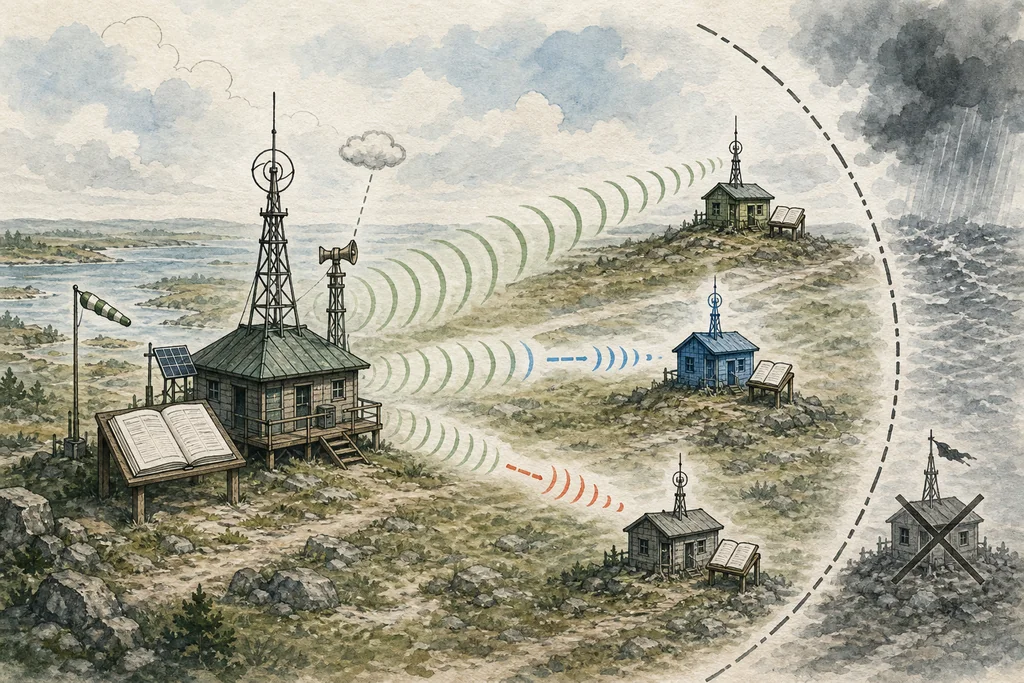
The timers are not a propagation countdown for recursive caches. They govern maintenance between authoritative copies. Record TTLs and negative caching operate on a separate path.
NOTIFY prompts a check; it does not carry the update
DNS NOTIFY reduces the delay of waiting for the next REFRESH interval. After a zone changes, a primary can notify secondaries that they should check the SOA.
The notification is a nudge, not a zone update. A secondary does not replace its data with fields from the NOTIFY message. It queries a configured primary, compares the serial, and then requests a transfer when required.
AXFR transfers the full zone over TCP. IXFR can transfer only the changes when both sides support an incremental history. Both mechanisms should be restricted to intended transfer partners; a public SOA answer does not imply public AXFR access.
NOTIFY also does not make the timers irrelevant. Messages can be lost, filtered, or rejected. REFRESH remains the periodic recovery path, RETRY handles failed checks, and EXPIRE prevents stale authority from continuing forever.
MINIMUM controls negative caching, not every positive TTL
The name MINIMUM carries historical baggage. Its modern meaning comes from RFC 2308: it contributes to the TTL for negative answers such as NXDOMAIN and NODATA.
The effective negative-cache TTL is the smaller of the SOA.MINIMUM value and the TTL of the SOA record included in the negative response. A recursive resolver counts that TTL down while caching the absence.
This field is not a universal floor or default for positive A, AAAA, MX, or TXT records. Positive records carry their own TTLs. In a zone file, an explicit record TTL or the separate $TTL directive supplies those values.
That distinction explains a common troubleshooting mismatch. Lowering an A record TTL does not necessarily make an earlier NXDOMAIN disappear sooner. If a resolver already cached the negative answer, its remaining negative TTL follows the SOA-based calculation.
Authoritative servers and recursive resolvers show different views
An authoritative server answers from its local zone data and sets the authoritative-answer flag for that zone. A recursive resolver may answer from cache or query other servers for the client.
Querying a familiar public resolver is useful for seeing what users may receive, but it is not the best first check of current zone state. Its SOA may be cached, and its displayed TTL can be partway through the countdown.
Query each authoritative server directly when comparing serials. Disable recursion for that check. Then query the recursive resolver separately to measure the cached view.
| Check | Command | What to inspect |
|---|---|---|
| Discover delegated nameservers | dig +short NS example.com | The authoritative server names returned through the delegation path |
| Ask an authoritative server | dig +norecurse +noall +answer +comments @ns.example.net example.com SOA | Authoritative-answer flag, MNAME, RNAME, serial, timers, and SOA TTL |
| Compare another authoritative | Repeat the direct query with each delegated server | Identical current serials and expected SOA data |
| Inspect a recursive view | dig +noall +answer +authority +comments example.com SOA | Whether the answer is cached and how its TTL differs from the direct view |
| Inspect negative caching | Query a deliberately unused name and read the authority section | The returned SOA and remaining negative TTL without changing production records |
Use a name that is known to be unused but harmless, under a zone you control. Do not create and delete a production record merely to generate NXDOMAIN; that mixes a cache experiment with an actual DNS change.
Managed DNS often owns the SOA record
Many managed authoritative platforms generate the SOA when a zone is created. Customers edit ordinary records while the provider owns MNAME, serial advancement, timers, transfer policy, and negative-cache defaults.
That is not inherently a limitation. Boring automation can remove a whole class of broken serials and unsafe timer combinations. The trade-off is that secondary DNS, custom transfer topology, or a specific negative-cache policy may require a higher service tier or a different zone mode.
Before choosing a managed platform for primary-secondary DNS, verify:
- whether the SOA fields are customer-editable or provider-generated;
- whether inbound or outbound AXFR and IXFR are supported;
- how transfer peers are authenticated and restricted;
- whether DNS NOTIFY is sent and accepted;
- how the provider advances serials after API or panel changes;
- whether negative-cache TTL can be configured independently.
Do not paste a second SOA record into a managed zone because a tutorial shows one. A zone should have one effective SOA at its apex, and the provider’s authoritative response is what matters.
Checklist
- Read the source fields: Query each authoritative server directly and compare MNAME, RNAME, serial, timers, and SOA TTL before blaming recursive propagation.
- Validate the serial path: Confirm that the served serial is newer under RFC 1982 rules and that every secondary has converged before attempting a rollback.
- Separate the timers: Treat refresh, retry, and expire as authoritative-replication controls while checking positive and negative cache TTLs independently.
- Respect provider ownership: Change generated SOA values only through documented provider controls, because adding a competing record can leave the served zone unchanged or invalid.
- Test absence safely: Use an unused name under a controlled zone to inspect negative caching without creating and deleting a production record.
The SOA record is best read as a maintenance contract. It names the source, identifies responsibility, versions the zone, schedules secondary checks, defines the stale-data boundary, and helps resolvers cache absence. Keep replication and caching on separate tracks, and the seven fields stop looking mysterious.
FAQ
Does an SOA record point a domain to a server?
Why does RNAME use a dot instead of an at-sign?
Should the SOA serial always be a date?
Does SOA MINIMUM set every DNS record TTL?
Can I edit the SOA record at a managed DNS provider?
Prepared by
VPS reliability, backups, and security basics
He explains VPS reliability, security basics, backup discipline, and provider trade-offs for cautious builders.
Verified facts
HostScout editorial