Self-host GitLab: Requirements and Setup
Self-host GitLab with realistic sizing, isolated runners, TLS, SMTP, upgrades, complete backup scope, restore drills, and an exit plan.

VPS reliability, backups, and security basics
He explains VPS reliability, security basics, backup discipline, and provider trade-offs for cautious builders.
Self-host GitLab only when you can operate more than the web interface: size memory and storage from measured workload, isolate CI runners, configure DNS, TLS and mail, plan upgrades, back up every storage boundary, and prove a same-version restore. Otherwise, a managed service is usually the safer starting point.
GitLab is an application stack, not merely a Git server. Repositories, a database, job queues, uploads, packages, container images, logs, CI workloads, mail, secrets, and upgrades all create separate capacity and recovery questions. The risk lives in the joins between them.
Decide whether self-hosting solves a real constraint
Self-host for a reason you can operate. Common reasons include network placement, integration control, data-location requirements, custom authentication, or predictable internal access. Owning the server is not automatically cheaper once administration, monitoring, backup storage, runner capacity, and incident time are counted.
Choose a managed service when the team lacks an on-call owner, cannot schedule regular upgrades, or has never restored the full platform. A successful installation is only the first milestone; the recurring work decides whether the service stays trustworthy.
Before buying infrastructure, name the owner for:
- operating-system and GitLab security updates;
- storage growth and performance monitoring;
- runner isolation and lifecycle;
- mail delivery, DNS, TLS, and certificate renewal;
- backups across every storage location;
- restore drills, upgrade rehearsal, and rollback;
- user access, audit needs, and decommissioning.
If each responsibility points to nobody, stop there. The missing resource is operational ownership, not RAM.
Treat GitLab’s baseline as a floor, not a production promise
Current GitLab documentation gives a single-node baseline of 8 vCPU and 16 GB of memory. It also says a memory-constrained single node can run with at least 8 GB. That lower figure describes constrained operation, not comfortable production capacity.
The official storage guidance lists at least 40 GB for application-node files, 5–12 GB for PostgreSQL, and repository storage at least as large as the repositories themselves. Those are starting categories, not a finished disk plan.
| Capacity area | Planning input | What the baseline misses |
|---|---|---|
| CPU and memory | Web requests, background jobs, repository operations, monitoring, and concurrency | Peaks, imports, upgrades, large pushes, and CI control traffic |
| Repository storage | Current Git data and expected growth | History, forks, LFS objects, temporary work, and headroom |
| Database | Projects, users, issues, merge requests, CI records, and metadata | Index growth, maintenance, upgrades, and working space |
| Object data | Artifacts, uploads, packages, registry images, Pages, and Terraform state | Retention policy, duplicate layers, failed jobs, and lifecycle delays |
| Logs and backups | Retention, compression, and restore copies | A local backup competing with production storage during an incident |
| Runners | Job concurrency, image sizes, caches, and build duration | CI compute is separate from the GitLab application baseline |
Size from workload composition. Ten developers building large container images can create more storage and runner pressure than a much larger group using repositories without CI. User count alone cannot describe imports, monorepos, artifact retention, registry churn, or scheduled CI work. Assume the cheap plan is crowded when the largest job arrives.
Start with measured estimates:
- repository and LFS volume, monthly growth, and largest push;
- artifact, package, registry, upload, and log retention;
- concurrent web sessions and API clients;
- CI job arrival rate, job duration, cache size, and runner concurrency;
- backup size, temporary space, and restore target capacity;
- growth headroom before storage expansion requires downtime.
Prefer SSD-backed local storage for an initial single node, especially for repository work. GitLab warns against burstable compute and disk for consistent performance and advises against network filesystems such as NFS for these paths.
Draw the storage and service boundaries first
The Linux package bundles the core services, which is a sensible first deployment for a small team. It reduces the number of independently managed components while preserving a supported upgrade path.
External services trade local simplicity for new boundaries. Moving PostgreSQL, Redis, repository storage, or object data elsewhere can improve scale or resilience, but it adds network dependencies, credentials, compatibility rules, monitoring, and separate backup procedures.
Write a topology sheet before installation. Include:
- the public hostname and DNS owner;
- TLS termination point and certificate renewal owner;
- GitLab application host and attached storage;
- database, Redis, repository, and object-storage locations;
- runner networks and allowed routes;
- SMTP relay and sender identity;
- backup destinations and the isolated restore environment.
The sheet should make failure domains visible. If the GitLab host and its only backup share one disk, account, or region, they share the same incident.
Install through a supported package path
Use a supported operating system and package build. Confirm that the required GitLab release exists for the chosen OS before provisioning. Avoid piping an unreviewed installer into a privileged shell; configure the official package repository through your normal system-management process.
For a package installation, set the final public URL before installation so generated configuration matches the hostname:
EXTERNAL_URL="https://gitlab.example.com" <approved-package-manager> install gitlab-ee
Run the command through your organization’s approved privilege mechanism. Replace the placeholder with the documented package command for the supported operating system; do not paste it unchanged.
After installation, verify services and run the built-in application check:
gitlab-ctl status
gitlab-rake gitlab:check SANITIZE=true
Change the initial administrator password immediately, store recovery credentials outside GitLab, and create a named administrator account for routine work. Keep emergency access separate and monitored.
Do not expose the instance before the boundary is ready. Restrict initial network access until TLS, administrator credentials, sign-up policy, SMTP, backups, and monitoring have been checked.
Configure TLS, mail, and identity before onboarding
The GitLab Linux package does not enable HTTPS by default. It supports automated certificates, manually supplied certificates, or TLS termination at a proxy or load balancer.
Choose one TLS owner. Document whether GitLab or an external proxy renews the certificate, which services need certificates, and how expiration is monitored. Test browser access, Git over HTTPS, API clients, SSH cloning, and the container registry path you intend to expose.
Mail is also an operating dependency. Configure SMTP with certificate verification, a valid sender address, and credentials stored outside source control. Then test invitations, password reset, mentions, and notification delivery. A green SMTP connection does not prove that mail reaches the intended mailbox.
If you add LDAP, SAML, or OAuth, keep a tested local emergency administrator. Document what happens when the identity provider is unavailable and how access is revoked when a user leaves.
Put CI runners on separate machines
GitLab explicitly recommends installing Runner on a machine separate from the GitLab instance for security and performance. Follow that separation even for a small production deployment.
A runner executes repository-controlled code. Jobs can consume CPU, memory, disk, and network; access mounted credentials; and attack neighbouring workloads. A container executor changes isolation mechanics but does not make untrusted code harmless.
Separate runners by trust level and workload:
- protected deployment jobs versus ordinary test jobs;
- trusted internal projects versus forks or untrusted contributors;
- privileged container builds versus jobs that need no elevated access;
- persistent specialist runners versus disposable general workers;
- networks with production access versus build-only networks.
Prefer ephemeral workers where practical, use narrow job tokens, protect deployment variables, and avoid sharing one non-ephemeral runner across projects with different trust. The shell executor deserves especially strict isolation because jobs run directly with the runner user’s permissions.
Runner capacity is its own budget. Do not add runner CPU and RAM to the GitLab application sizing and call the total one server. Measure queue time, job duration, cache and image growth, failed-job cleanup, and the maximum safe concurrency per worker.
Back up every storage boundary
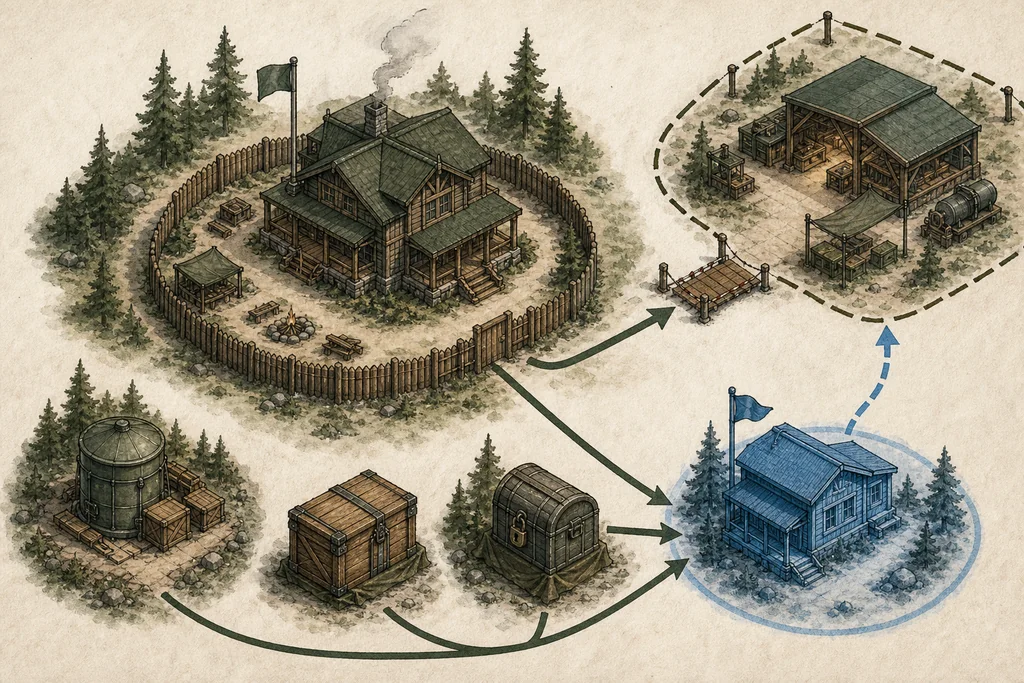
The GitLab backup command creates an archive containing database data, repositories, local registry and package data, artifacts, uploads, wikis, LFS objects, Pages content, and other application data. Its scope changes when those objects live outside the GitLab host.
Create an application backup with the documented command for the Linux package:
gitlab-backup create
That archive is not the whole recovery plan. GitLab documents important exclusions: external object storage, configuration files, TLS and SSH keys, hooks, Redis state, and other system files require separate treatment.
| Recovery input | Why it is separate | Verification |
|---|---|---|
| GitLab application archive | Captures supported application data at a point in time | Archive completes, is copied off-host, and can be read by the restore account |
| External object storage | The package backup does not copy remote buckets | Versioned or snapshotted objects align with the application recovery point |
| Configuration and secrets | Application settings, secret material, TLS and SSH keys are excluded | Files are encrypted, access-controlled, and available during an isolated restore |
| Runner configuration | Runner hosts and local caches are outside the GitLab application archive | Runners can be rebuilt without preserving untrusted job residue |
| Infrastructure definition | DNS, firewall, storage, monitoring, and service dependencies live outside GitLab | A new environment can be provisioned without the failed instance |
Store backups under a different failure and account boundary from production. Encrypt them, limit deletion rights, monitor age and completion, and define retention from recovery needs rather than available disk alone.
Do not assume that container registry images are safe because the archive lists registry data. If the registry uses external object storage, back up that storage through its own mechanism and align its recovery point with GitLab metadata.
Prove the restore on a fresh destination
GitLab restore requires a working installation at the same GitLab version as the backup. Keep the exact package version, OS compatibility notes, configuration, secrets, and object-storage procedure needed to recreate that destination.
Test the restore; that is the acceptance test. Build an isolated instance, restore every required input, and verify more than sign-in:
- repositories clone over SSH and HTTPS;
- issues, merge requests, users, and permissions appear correctly;
- LFS objects, uploads, artifacts, packages, and registry images are available;
- CI configuration loads without allowing restored runners to contact production;
- outbound mail and webhooks remain disabled until intentionally tested;
- application checks pass and selected projects match recorded business totals.
Measure the drill from declared disaster to usable service. Record missing credentials, manual decisions, bottlenecks, and the largest recovery gap. Fix the procedure and repeat it; an archive that has never crossed the restore path is only a storage expense.
Rehearse upgrades and keep an exit plan
GitLab upgrades can require intermediate stops, completed background migrations, operating-system compatibility, and component-specific checks. Review the required upgrade path and release notes instead of jumping directly to the newest package.
Before an upgrade, run health checks, take the coordinated backups, confirm free working space, and test the sequence on a production-shaped clone. Define rollback before changing the database or package state.
Keep installation and recovery versions obtainable. A rollback may need the previous package and configuration; a restore needs the same GitLab version as its archive. Record package sources and checksums in the operating procedure, not only inside the instance being recovered.
An exit plan should explain how to:
- export or migrate repositories and application metadata;
- preserve LFS, packages, artifacts, registry images, and attachments that matter;
- rotate integrations, runner tokens, deploy keys, and webhooks;
- lower dependency on database-specific or GitLab-specific automation before migration;
- change DNS and SSH endpoints with a rollback window;
- retain required audit or project data after shutdown;
- revoke credentials and securely erase retired hosts and backups.
Self-hosting is justified when this operating work buys control the team actually needs. If the runbook is consistently larger than the benefit, moving to a managed service is a valid reliability improvement.
Checklist
- Size the workload: estimate repositories, LFS, artifacts, registry, database growth, web peaks, and runner concurrency beyond the official floor.
- Separate execution: place runners outside the GitLab host and divide them by trust, privilege, network reach, and lifecycle.
- Close the service boundary: verify DNS, TLS renewal, SMTP delivery, identity fallback, monitoring, and supported upgrade paths before onboarding.
- Build recovery: coordinate the GitLab archive, external object storage, configuration, keys, and infrastructure records under separate failure boundaries.
- Prove the exit: complete an isolated same-version restore and document upgrade rollback, migration, credential rotation, and decommissioning.
Common questions
FAQ
Is 8 GB of RAM enough for self-hosted GitLab?
Can GitLab Runner run on the same server?
Does gitlab-backup include container registry and object storage?
Can I restore a backup into a newer GitLab release?
Prepared by
VPS reliability, backups, and security basics
He explains VPS reliability, security basics, backup discipline, and provider trade-offs for cautious builders.
Verified facts
HostScout editorial