What Is Docker? Images, Containers, and Hosting
Docker explained for self-hosters: how images, containers, registries, runtimes, volumes, networking, and virtual machines fit together.

VPS reliability, backups, and security basics
He explains VPS reliability, security basics, backup discipline, and provider trade-offs for cautious builders.
Docker is a platform for packaging an application with its dependencies and running it as an isolated process called a container. For self-hosters, its practical value is repeatable deployment: the same image can move from a laptop to a server without rebuilding the host around the app.
The risk is assuming that packaging also operates the service. Docker can make an application easier to start, replace, and move, but it does not choose a safe image, patch the server, protect secrets, back up persistent data, or test the restore. Those jobs still belong to the operator.
Docker in plain terms
Docker is both a container platform and a set of tools. It gives you a repeatable path from application files to a running process:
- A Dockerfile describes how to build the application package.
- The build produces an image.
- A registry stores and distributes that image.
- Docker Engine pulls the image and creates a container from it.
- The runtime asks the host operating system to isolate and start the container process.
That sequence is the useful mental model. Docker is not the container itself, just as a kitchen is not the meal. It is the machinery around building, moving, and running containers.
The six terms worth learning
| Term | What it means | What it is not |
|---|---|---|
| Dockerfile | Build instructions for an image | A running service |
| Image | An immutable, layered application package | A live process |
| Container | A runnable instance of an image | A full virtual machine |
| Docker Engine | The client, API, and daemon that manage Docker objects | The application inside the container |
| Registry | A public or private store for images | Persistent application storage |
| Compose | A declarative model for a multi-container application | A production orchestrator by itself |
An image may be used to create many containers. Replacing a container does not rewrite its image; it creates a new runnable instance from the selected image and configuration.
Image, container, and runtime: the actual boundary
An image contains the files, binaries, libraries, and configuration required by the application. Its layers are immutable: a change creates another layer or another image. This makes the application package reproducible and easier to distribute.
A container is the isolated process created from that image. It receives runtime configuration such as environment variables, mounts, networks, ports, resource limits, and the command to start. The container can also have a writable layer, but that layer is a poor home for data you cannot afford to lose.
The runtime is the lower-level component that turns an image prepared as a filesystem bundle into a process with the requested operating-system isolation. Open container specifications separate the image format from the runtime contract, which is why container images and runtimes are broader concepts than one Docker command.
Docker containers versus virtual machines
The key difference sits below the application. Containers share the host operating-system kernel. A virtual machine includes a guest operating system with its own kernel above virtualized hardware. That makes a container an isolated process, not a tiny VM.
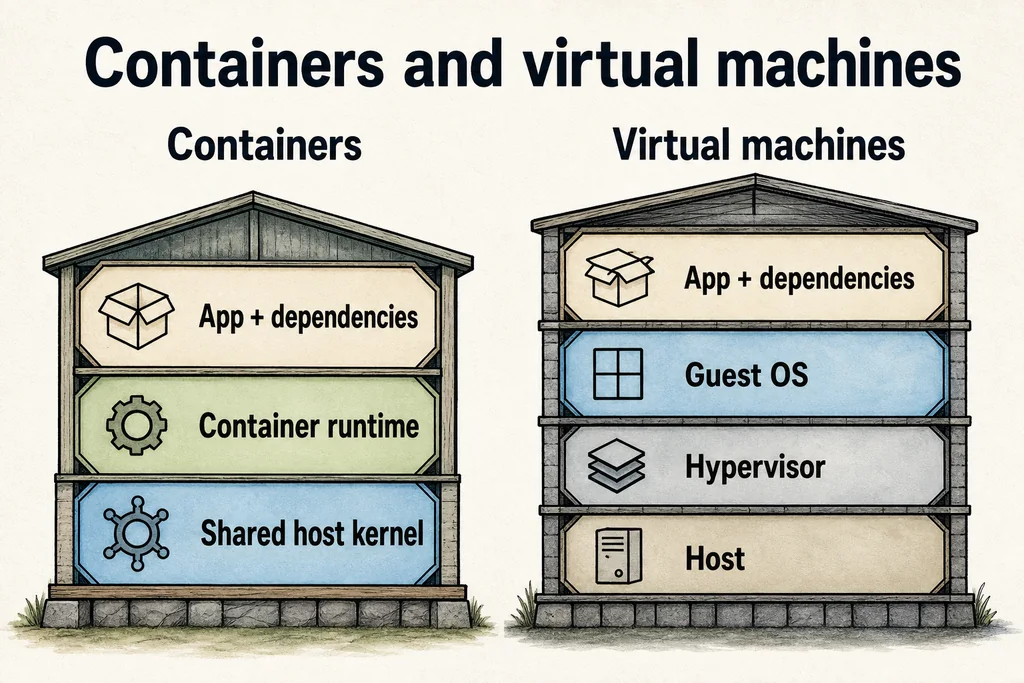
That shared-kernel design is the main architectural difference, not a promise that containers replace virtual machines.
| Question | Container | Virtual machine |
|---|---|---|
| What runs the app? | An isolated process using the host kernel | A process inside a guest operating system |
| What is packaged? | App files and user-space dependencies | App, guest OS, and virtual hardware configuration |
| What is the isolation boundary? | Operating-system process and resource controls | A virtualized machine boundary |
| Can they be combined? | Yes, containers often run inside a VM | Yes, a VM can be the Docker host |
Use a VM when you need a separate kernel, a different guest operating system, or a stronger machine-level boundary. Use containers when repeatable application packaging and efficient process isolation solve the problem. On rented infrastructure, the ordinary pattern is Docker running inside a VPS or cloud VM, so this is rarely an either-or decision.
What Docker solves for a self-hoster
Docker is most helpful when the application already publishes a maintained image or provides a clear Compose file.
- Dependency isolation. Two applications can use different user-space libraries without installing both sets directly on the host.
- Repeatable deployment. Image plus configuration gives you a known application package across development, testing, and the server.
- Clean replacement. An update can create a new container from a new image while persistent data remains mounted separately.
- Multi-service definition. Compose can describe an application, database, cache, networks, and volumes in one YAML model.
- Simpler rollback preparation. Keeping a known image reference and compatible data backup gives you a route back when an update fails.
The last point needs care. Rolling back an image does not automatically roll back a database migration. The application package and the persistent data have separate lifecycles.
What Docker does not solve
Docker does not make an unknown image trustworthy. It does not make a published port safe, turn a single server into high availability, or guarantee that a container cannot affect its host. It also does not size the VPS for you.
Treat these as separate operator decisions:
- who built the image and how you will track updates;
- which ports must be reachable from the internet;
- where secrets live and which process can read them;
- which data must persist and how it is backed up;
- how much memory and CPU each service may consume;
- what happens after a crash, reboot, failed health check, or broken upgrade;
- how logs and alerts reach you before users report the failure.
By default, a container has no Docker resource limit. On a small host, one memory-hungry service can therefore pressure everything else. Set limits from observed workload behavior, then leave enough headroom for the host, Docker, backups, and traffic spikes.
Storage: containers are replaceable, data is not
Docker volumes are managed persistent stores mounted into containers. They outlive a particular container, which makes them the normal place for databases, uploads, and other state that must survive replacement.
Bind mounts expose a chosen host path inside a container. They are useful when the operator needs direct access to configuration or files, but they also tie the deployment more closely to the host’s directory layout and permissions.
The practical rule is simple: be able to delete and recreate the container without losing the service’s important data. If that test is frightening, the storage boundary is not ready.
A volume is not a backup. Back up the actual persistent data in an application-consistent way, store a copy away from the Docker host, and test the restore. The restore test is the fire drill; discovering an incompatible database dump during an outage is the real fire.
Networking: published does not mean protected
Containers can communicate through Docker networks and can make outbound connections. A service becomes reachable from outside the host only when its traffic is routed or a port is published.
Keep databases and internal services on a private application network when they do not need public access. Publish only the reverse proxy or the specific service endpoint users require. Then apply the host firewall, TLS, authentication, and application-level access controls as normal. Docker networking does not replace any of them.
With Compose, service names can provide stable discovery within the application network. That is preferable to hard-coding container IP addresses, which may change when containers are recreated.
A sensible Docker setup on a VPS
Rent boring infrastructure: a supported Linux release, enough memory for the real workload, storage with room for images and backups, and a recovery path you understand. Novelty in the host rarely makes a containerized application easier to operate.
Before putting the service on the internet, check this list:
- Image: use a maintained source, record the chosen version, and decide how updates are reviewed.
- Privileges: run the application as a non-root user where supported; consider rootless Docker when its limitations fit the workload.
- Secrets: keep passwords and tokens out of the image and out of public Compose files.
- Storage: map every persistent path to a volume or deliberate bind mount.
- Backup: define what is copied, where it goes, how long it is kept, and how restoration is tested.
- Network: expose only required ports and keep internal dependencies private.
- Resources: set realistic memory and CPU limits, then watch the host under load.
- Lifecycle: define restart behavior, health checks, log rotation, and the order in which services start and stop.
- Updates: test a new image against a copy of the data before replacing the working service.
- Exit: document how to rebuild the service on a fresh host without relying on shell history.
This is intentionally a checklist-length answer. Docker reduces configuration drift; it does not reduce the value of knowing how the service fails.
Checklist
- Package: record the image source and chosen version so an update is a reviewed change, not a surprise.
- State: move every persistent path outside the container writable layer before treating containers as replaceable.
- Exposure: publish only required ports and keep databases on a private application network.
- Recovery: back up the persistent data away from the host and complete a restore test.
- Operations: set resource limits, health checks, restart behavior, logging, and an exit procedure for a fresh host.
When Docker is a good fit
Choose Docker when you run several applications with conflicting dependencies, want a repeatable deployment across machines, or receive a well-maintained container image from the application project. It is also useful when a Compose definition makes a multi-service stack easier to understand than a trail of manual package installations.
Skip Docker, at least initially, when the service is one small process that your operating system packages well and your team already operates confidently. An extra abstraction is not automatically an improvement. Also pause when the available image is abandoned, opaque, or asks for broad host privileges without a clear reason.
For a single server, Docker Engine plus Compose is often enough. For many nodes, automated scheduling, service discovery, rolling deployment, and cluster recovery become separate orchestration questions. Do not adopt a cluster because a diagram looks tidy; adopt it when the failure and deployment requirements justify the operational cost.
A compact glossary
- Container: an isolated runnable process created from an image.
- Image: an immutable, layered package used to create containers.
- Dockerfile: instructions used to build an image.
- Registry: a service that stores and distributes images.
- Volume: Docker-managed persistent storage mounted into a container.
- Bind mount: a host file or directory exposed inside a container.
- Compose file: a YAML definition for an application’s services and related resources.
- Runtime: the component that creates and runs the isolated process from a prepared bundle.
FAQ
Is Docker a virtual machine?
Does a Docker image include an operating system?
Will deleting a container delete its data?
Do I need Docker Compose?
Is Docker secure by default?
Prepared by
VPS reliability, backups, and security basics
He explains VPS reliability, security basics, backup discipline, and provider trade-offs for cautious builders.
Verified facts
HostScout editorial