What Is a Website? What It Needs to Go Live
What is a website? Learn how pages, domains, DNS, hosting, browsers, security, renewals, and backups fit together before you launch.

WordPress hosting and renewal-cost traps
She audits WordPress plans, renewal bills, backups, and plugin-heavy stores for independent operators.
A website is a collection of connected pages and assets that a browser can request and display. To go live, it needs publishable content, web hosting, a domain people can type, DNS records that point to the host, secure delivery, and someone who controls renewals, access, and backups.
A website is not a domain or a browser
A webpage is one document that a browser can display. A website groups pages, images, styles, scripts, and links into one resource. It may be a simple set of files or a dynamic application that builds pages from templates and stored content.
A domain is the memorable address. Owning one does not create the pages or store them. A browser is the software that requests the site and turns the returned files into the page a visitor sees.
Hosting is where those files live or where the application runs. A web server accepts the browser’s request and returns the requested resource. Keep the jobs separate: the domain names the destination, DNS locates it, hosting serves it, and the browser displays it.
How the domain reaches the browser
A visitor enters the domain. DNS finds the hosting destination, the browser requests the site, and the host returns the files the browser displays.
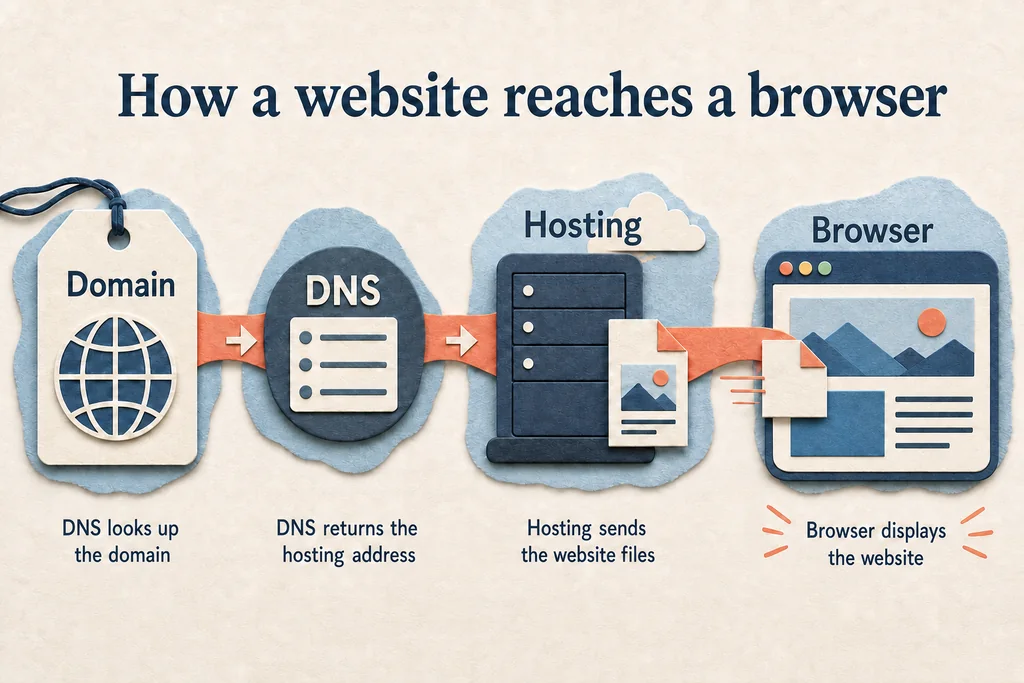
The route is deliberately simplified. A real site may add a content delivery network, reverse proxy, several servers, or a separate application and database. Those layers can change the path, but not the basic jobs.
Here is the warning before the recommendation: changing a domain registrar does not move the website, and moving the website does not update DNS by itself. Record who controls each account before launch.
What the website itself contains
The visible page usually starts with HTML for structure, CSS for presentation, and images or other media. JavaScript can add interaction. A static host sends prepared files; a dynamic system may assemble the response from an application and database.
Content is more than page copy. A launch also needs:
- navigation and contact details;
- error pages and redirects;
- accessible labels and image descriptions;
- a useful page title and description;
- a real destination for form submissions, not just a button that looks finished.
Security belongs in delivery. The public site should use HTTPS, while administrator accounts need strong authentication and limited access. Updates matter when the site uses a content management system, plugins, themes, or server-side software.
Choose a practical way to publish
The right route depends on how much control you need and who will maintain the site after launch.
| Publishing route | Good fit | Main responsibility to check |
|---|---|---|
| All-in-one builder such as Wix or Squarespace | A small business site maintained through a visual editor | Export limits, renewal terms, account ownership, and domain control |
| Hosted site or CMS with Hostinger | A site that needs familiar hosting controls or a content system | Updates, backups, resource limits, and migration access |
| Static deployment with Netlify | A brochure, documentation, or developer-built site with prepared files | Build ownership, form handling, redirects, and deployment access |
Do not choose by homepage polish. Choose the route that the future owner can update, back up, pay for, and leave without rebuilding everything from scratch.
An all-in-one service reduces setup work, but it can concentrate the editor, hosting, billing, and domain connection in one account. Separate hosting adds moving parts, yet may provide a clearer migration path. Neither model removes the need to document access.
What “go live” actually requires
Before launch, the content must be on the host and the domain’s DNS records must point to the correct destination. HTTPS must work on the public address. Test the homepage, navigation, forms, redirects, and error handling from outside the administrator’s account.
Check ownership before design polish. The business or site owner should control the domain registration, hosting account, billing email, recovery methods, and a current backup. An agency login should not be the only key.
Then read the renewal line. Domain registration, hosting, builder plans, email, and paid extensions can renew on different schedules. A cheap first term helps only when the ongoing total still fits the budget.
Keep a copy outside the live account. A backup is the spare key under your own control. For a dynamic site, that means files and data. For a builder, confirm what can actually be exported and what must be recreated.
Test the public site, not the preview
Open the site in a private browser window and on a phone using mobile data. Follow every primary navigation path. Submit each form and confirm the message reaches its destination. Check that important pages have useful titles and that images do not break the layout.
Test a nonexistent address and an old URL if the site replaces another version. Confirm that redirects lead to the intended page. Search engines and visitors will find paths the editor preview never showed.
Finally, write down the domain registrar, DNS host, website host, administrator, backup location, and renewal owner. That short record turns a collection of services into something maintainable.
Checklist
- Confirm who owns the domain, DNS, hosting, billing email, and recovery methods before launch.
- Point DNS only after the website works on its temporary hosting address and a rollback path exists.
- Verify HTTPS, navigation, forms, redirects, and error pages from outside the administrator account.
- Store a restorable copy outside the live platform and document how to recover it.
- Read every renewal term and record who will maintain content, software, and payments.
FAQ
Is a domain name the same as a website?
Do I need hosting if I use a website builder?
Can a website work without a custom domain?
What should I back up before launch?
Prepared by
WordPress hosting and renewal-cost traps
She audits WordPress plans, renewal bills, backups, and plugin-heavy stores for independent operators.
Verified facts
HostScout editorialRelated articles
Website Builders Compared by What You Keep
Website builders compared by ownership, export, hosting, commerce, recurring cost, accessibility, performance, and support before you commit.
Fix WordPress Plugin Conflicts Safely
Fix WordPress plugin conflicts without guessing: isolate the cause on staging, preserve rollback, read useful logs, and verify the whole site.
Linux swap file setup for a low-RAM VPS
Linux swap file setup for a low-RAM VPS, with practical sizing rules, OOM tradeoffs, checks, and when to upgrade RAM instead.
What Is an Email Alias and When to Use One
What is an email alias? Learn how aliases route mail, when they beat a mailbox, and what to check before choosing email hosting.
What is WordPress? .org vs .com explained
What is WordPress? Learn how WordPress.org and WordPress.com differ, what each costs, and when self-hosted WordPress is worth it.
How to build a website: domain, hosting, platform
How to build a website by choosing the right platform, domain, DNS and hosting path, with checks for cost, ownership and migration risk.